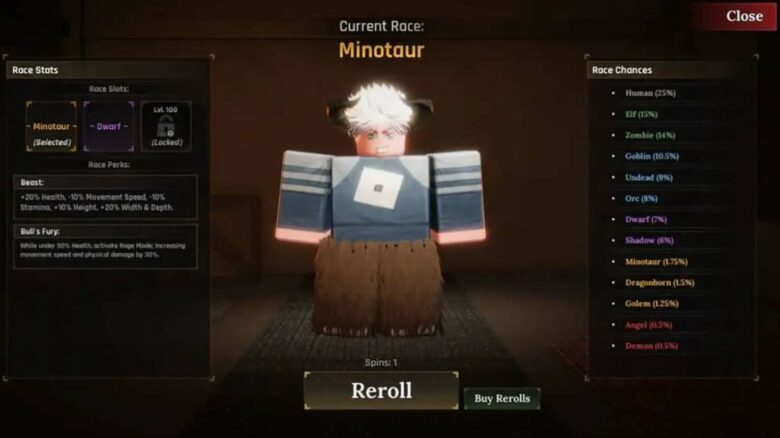
Rerolls play a crucial role in The Forge, allowing players to change their race and enhance their performance in the game. Each of the thirteen available races offers distinct advantages, influencing how effectively players gather resources or battle opponents. Stronger and rarer races often provide the most beneficial bonuses, making rerolls an important element for progressing efficiently.
Because the odds of obtaining a Legendary or Mythical race are low, gaining more rerolls becomes an effective way to improve those chances. Players who struggle with less favorable races can use rerolls as a strategic tool to better align their character’s abilities with the game’s toughest challenges, such as locating rare materials or defeating elite enemies.
Getting extra rerolls in The Forge
Players can increase their rerolls in The Forge through both free and paid options. Free rerolls are periodically offered through promotional codes released by the developers, usually tied to game updates or special events. These codes can expire quickly, so players need to redeem them soon after release. Joining the official The Forge Discord community allows players to access a dedicated “codes” channel, where the newest active codes appear first.
To redeem a code, players should open the game’s Settings menu, scroll to the Codes section, and paste the code into the provided input box. Once confirmed, the additional rerolls will appear automatically in the Race Menu for immediate use. Regularly checking for new event codes supports steady reroll accumulation without spending currency.
For players who prefer faster access, rerolls can also be purchased using Robux. This option becomes available through the in-game Shop by selecting the Buy Spins panel. The table below lists current reroll package options and their approximate Robux cost:
| Reroll Quantity | Robux Cost |
|---|---|
| 1 | 30 |
| 5 | 120 |
| 10 | 230 |
Robux functions as a paid in-game currency acquired with real money. Players should confirm prices before completing any transaction to manage costs effectively.
How to use rerolls
Players can apply rerolls through the Race Menu found in the Shop interface to change their character’s race. Rerolling adjusts racial traits, which influence performance in combat, mining, and other activities. After reaching level 100, up to three race slots become available, allowing players to store and swap between races when needed.
Notable races and traits:
| Race | Trait Focus | Rarity |
|---|---|---|
| Angel / Demon | Balanced power with strong bonuses | Very High |
| Dragonborn | Offensive strength | High |
| Minotaur | Durability for close combat | High |
| Golem | Defense and stability | High |
| Dwarf | Mining efficiency | Moderate |
| Orc | Combat capability | Moderate |
Saving valuable rolls for rare races ensures long-term flexibility in gameplay.