Fortnite now lets you request refunds for certain skins and cosmetic items under special circumstances. With the launch of Chapter 7 Season 3, Epic Games updated more than gameplay features and cosmetics; it also adjusted how you can return purchases.
You still need to follow most existing refund rules, but you can now return select cosmetics that caused issues in the past, no matter when you bought them. This change expands your options and gives you more flexibility when managing your in-game purchases.
What Has Changed in Fortnite’s Skin Refund Policy?
You no longer have to rely only on the original two refund methods. In the past, you could either cancel a purchase within 24 hours if you had not used the item, or spend one of your three yearly refund tickets within 30 days of buying it.
Chapter 7 Season 3 introduced a third path. You can now request refunds for certain cosmetics under special circumstances, even if they fall outside the normal 24-hour or 30-day limits.
This change applies to specific items that raised issues after release. In some cases, Epic adjusted cosmetics that gave unintended gameplay advantages. For example, certain superhero outfits allowed color combinations that made players harder to see, which led to balance concerns. Players who purchased those outfits can now choose to return them for full V-Bucks.
Other refunds connect to technical or design problems. Some cosmetics were temporarily disabled due to animation errors. Others did not include features that promotional material promised at launch. When those situations occur, you may see a refund option appear directly in your Locker.
Key differences include:
- No refund ticket required for eligible special-case items
- No strict 30-day limit for approved cosmetics
- Full V-Bucks returned when you complete the refund
You will not see every item qualify. Only cosmetics flagged under Epic’s special criteria display the additional refund option in your account.
How can I return skins?
Open Settings from the main lobby.
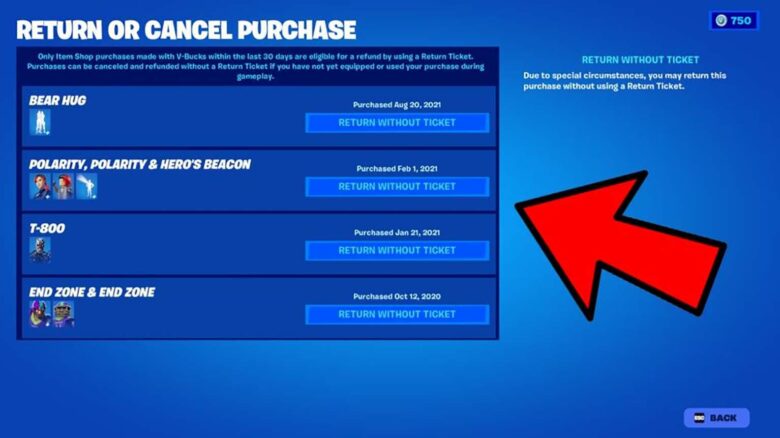
Go to the last tab under Account & Privacy, then select Return or Cancel Purchase.
You will see a list of eligible skins and cosmetics that you can refund without using a Return Ticket. Choose the item you no longer want and confirm the return to receive your V-Bucks back.
Epic Games has made this option permanent. If you find unused cosmetics in your locker, you can exchange them for V-Bucks and spend them on other items.