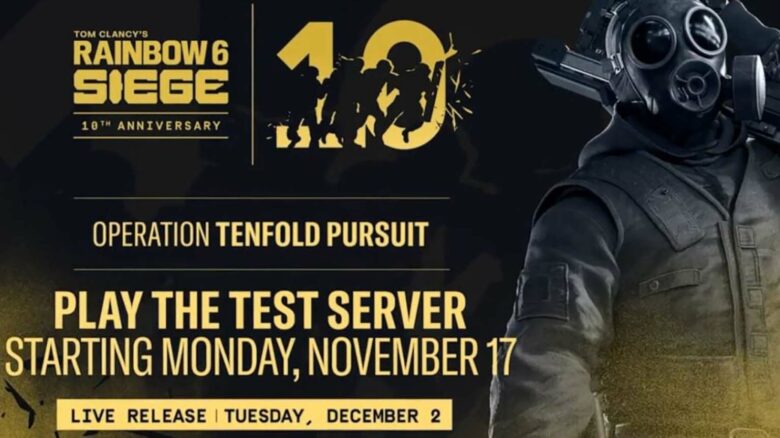
I view the Rainbow Six Siege X Test Server as a practical way to explore upcoming updates before they reach the main game. It gives me early access to new features and balance changes, letting me understand how they might affect gameplay and strategy. The process to join is straightforward, as long as I already own the PC version of the game.
Keeping the Test Server installed saves me time when Ubisoft launches new testing phases. Since updates can appear without much warning, having the files ready ensures I can jump in immediately and avoid long downloads on release days.
Understanding the Rainbow Six Siege X Test Servers
I use the Rainbow Six Siege X Test Servers to explore new gameplay updates before they reach the live version. Access is free for anyone who owns the PC edition of the game. These servers typically open when a new Operator or major feature is nearing release, giving players a limited window to test and share feedback directly with the developers.
The test environment differs from the live game. Progress does not carry over, and players often encounter unfinished content or technical issues. This setup helps Ubisoft identify bugs and balance gameplay before updates roll out publicly.
| Feature | Description |
|---|---|
| Access | Available to PC players who own the base game |
| Purpose | Test new Operators, gadgets, and mechanics |
| Data Saving | None; progress resets after testing |
| Feedback Role | Player reports influence final adjustments |
I find the Test Servers useful for learning new mechanics early and contributing to improvements that shape the next season.
Duration of Test Server Availability
I’ve noticed that Rainbow Six Siege X test servers stay online for different lengths of time depending on their purpose. The schedule usually follows a predictable pattern:
| Type of Test Server | Typical Duration |
|---|---|
| Season Test Server | About 3 weeks |
| Lab Test Server | Around 1 week |
| Balancing Test Server | Around 1 week |
These timeframes may shift slightly if a test overlaps with a weekend, though the change is usually only a few days. I find The Lab environment especially interesting because it often includes early or experimental features. Some of these ideas never reach the live version, but they give players a chance to see how new mechanics might shape future updates.
How to Install the Siege Test Servers on PC
I access the Siege Test Servers through the Ubisoft Connect launcher. After signing in, I open My Games, where the Test Server usually appears beside the main game. If testing is not active, it moves to the Expired section within the same menu.
If I don’t see the Test Server, I restart Ubisoft Connect to refresh my library. This often forces the new entry to appear. When that doesn’t work, I check the Owned Games filter to ensure it isn’t hiding the test version.
| Step | Action |
|---|---|
| 1 | Open Ubisoft Connect |
| 2 | Go to My Games |
| 3 | Locate or refresh the Test Server |
Can You Access the Test Servers Through Console or Steam?
I can’t launch the Test Servers directly on a console, but I can still request access through Ubisoft’s official site. After submitting a request, I receive permission to join the testing program even if I usually play on another platform.
To participate, I must install and use Ubisoft Connect on a PC. Once my request is approved, the Test Server appears in my My Games library. Approval often arrives quickly, though access may take longer once new tests go live.
Access steps summary:
| Step | Action | Platform |
|---|---|---|
| 1 | Submit Test Server access request | Website |
| 2 | Install Ubisoft Connect | PC |
| 3 | Launch from My Games library | PC |
When the Upcoming Rainbow Six Siege Test Server Opens
I can access the Test Server for Operation Tenfold Pursuit starting November 17, with testing expected to end shortly before December 2, when the full update launches. These servers give me early access to new features before they reach the live version.
If that window has already ended, I usually anticipate the next test period around the next major season or a significant mid-season patch.
Typical timing pattern:
| Event Type | Expected Test Server Window |
|---|---|
| New Season Announcement | Within a few weeks |
| Esports Event Reveal | Within days |
| Mid-Season Patch | Shortly before rollout |
This schedule helps me plan when to test upcoming gameplay changes.