You can earn new League of Legends emotes during the 2026 season by watching select Twitch streams that support Drops. These rewards connect directly to your Riot account and unlock as you spend time on eligible broadcasts.
Riot works with creators in the League Partners Program to run these Drops, which helps streamers while giving you in-game cosmetics. By choosing approved channels and tracking your progress on Twitch, you can collect emotes without changing how you already watch content.
New League of Legends Twitch emote drops
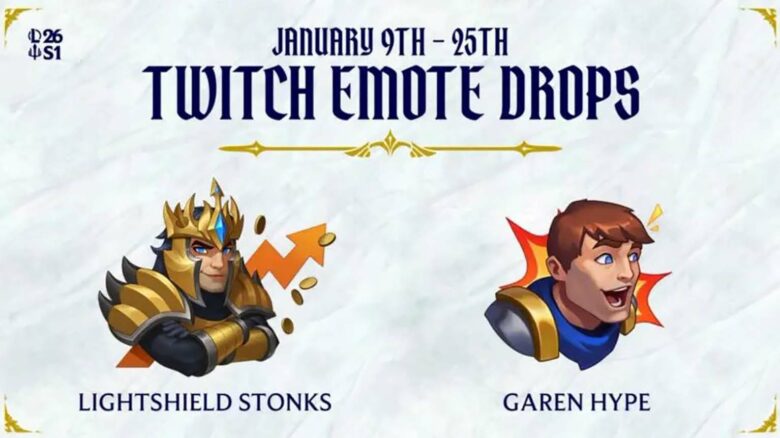
You can unlock the GarenHype emote through Twitch by supporting an eligible LPP creator. The drop follows strict rules:
- Subscribe or gift a first-time subscription to a qualifying channel
- Re-subscriptions do not count toward rewards
These limited emotes feature Demacia-themed champions and appear directly in your League client once claimed.
Which channels are eligible?
You can only earn League of Legends Twitch Drops on channels that actively participate in the current campaign. If a streamer does not belong to the League Partner Program or the campaign does not list their channel, Drops will not progress on that stream.
Start by signing in to Twitch and opening Drops & Rewards. Select an active League of Legends campaign, then review the How to Earn Drops area. Twitch displays participating channels at the top, which lets you confirm eligibility before you start watching.
When you open an eligible stream, Twitch marks it clearly. You will see a Drops-enabled notice at the top of chat with campaign details. This visual indicator confirms that your watch time or subscription can count toward rewards.
Key eligibility checks
| What to check | What it means for you |
|---|---|
| Drops callout in chat | Confirms the stream counts for progress |
| Correct game category | Must be live under League of Legends |
| Active campaign window | Progress only counts during the event |
| One channel at a time | Multiple tabs do not stack progress |
Some Drops require watch time, while others require new subscriptions. You can subscribe on mobile or desktop, but only purchases made while the channel is live and during the active campaign will qualify.
Drops are not locked by region, but Twitch must support Drops where you live. Twitch remains the only platform where these rewards apply, so watching elsewhere will not count.
Claim your League of Legends Twitch emote rewards
You must link your Riot account to your Twitch account before Drops will register. Watch an eligible stream until the progress bar reaches 100%, then open your Twitch Drops & Rewards inventory to claim the emote.
After you claim it, the emote delivers to the League of Legends account connected to Twitch. If you miss the claim window during the broadcast, Twitch still gives you time to collect it later.
Helpful checks if progress stalls:
- Turn off ad‑blocking or privacy extensions that may block watch-time tracking.
- Confirm the correct Riot account connects to Twitch before claiming.
- If a claimed Drop does not appear in-game, contact Riot Support with your Twitch receipt.
You have a limited grace period to collect earned Drops after the campaign ends. Claiming within that window prevents forfeiting the reward.
| Step | What you do | Where |
|---|---|---|
| 1 | Link accounts | Riot + Twitch settings |
| 2 | Watch eligible streams | Twitch |
| 3 | Claim at 100% | Drops inventory |
Drop schedule and claim deadline
The emote Drop campaign runs January 9 through January 25. You can still claim earned Drops for seven days after the campaign closes. Make sure you collect them before the grace period expires.