You can download Update 2 and access it immediately, expanding your options across customization, combat tools, and core systems. Hypixel Studios shipped the update shortly after revealing its patch notes, continuing a fast post-launch cadence.
You now have more control over how your character looks during play. The update lets you toggle armor visibility at any time, so you can prioritize appearance without sacrificing gear stats. This change addresses one of the most common community requests since early access began.
Customization updates extend beyond armor display. You will notice refinements to character presentation that make it easier to maintain a consistent visual identity while progressing through different equipment tiers.
A major gameplay addition arrives through a new magical item tied to necromancy. You can obtain a grimoire that enables you to raise skeletal allies from bone piles, introducing minion-based combat into regular play. This feature adds a tactical option rather than replacing existing combat styles.
The grimoire does not drop from standard enemies. You can only find it as a potential reward from the large Praetorian Skeleton, which keeps necromancy limited and progression-based. Hypixel has confirmed that this item connects to a broader magic system planned for a later update.
You will also encounter a wide set of smaller changes that affect everyday gameplay. Farming has received several adjustments designed to smooth progression and reduce friction during resource production. These tweaks reflect ongoing balancing rather than a complete overhaul.
Below is a breakdown of notable additions included in Update 2:
| Feature Area | What You Can Do |
|---|---|
| Character Customization | Hide or show armor visuals on demand |
| Combat & Magic | Use a necromancy grimoire to summon skeletal minions |
| Enemy Loot | Hunt Praetorian Skeletons for rare magic drops |
| Farming Systems | Experience revised growth and interaction tuning |
| Quality of Life | Navigate cleaner interactions and system feedback |
You may notice improvements that feel subtle at first but matter over longer sessions. Interface clarity, feedback timing, and minor interaction rules now behave more consistently across systems. These updates focus on reducing confusion rather than adding complexity.
Update 2 also prepares groundwork for creators who build content beyond the base game. Hypixel has readied documentation for WorldGen V2, making it easier for you or other modders to understand how terrain generation works internally. This step signals formal support rather than informal experimentation.
Hytale’s history as a mod-driven project shapes these decisions. The game started as a server project before evolving into a standalone release, and its systems continue to reflect that origin. By improving access to technical documentation, Hypixel lowers the barrier for higher-quality mods.
You have likely already seen early mods emerge at a fast pace. With official world generation references on the way, those projects can move beyond surface-level changes and into deeper structural design. Over time, this can improve stability and compatibility across the modding ecosystem.
The pace of updates stands out given how recently early access began. Hypixel launched the game in mid-January 2026 and released multiple large patches within the first two weeks. This approach emphasizes iteration over long gaps between updates.
That momentum ties directly to the studio’s current position. Early access traction secured enough funding to support development for several years, allowing the team to focus on rapid improvements instead of short-term monetization pressure. Update 2 reflects that flexibility.
You can also see signs of future planning embedded in current content. The necromancy grimoire exists as a functional tool now, but its design points toward an expanded magic framework later. Hypixel has framed it as an early piece, not a finished system.
Several adjustments in Update 2 hint at continued balancing passes rather than final numbers. Farming, resource flow, and enemy tuning remain open to revision as player data accumulates. You should expect these systems to change again as feedback grows.
Key themes you will notice throughout the update include:
- Player choice in visual presentation
- Optional complexity through magic and minion systems
- Incremental balance instead of sweeping redesigns
- Modder support through clearer technical access
You are not required to engage with every new feature to benefit from the update. Even if you avoid necromancy or mods, the customization options and quality-of-life changes affect nearly every play session.
Hypixel has already confirmed that Update 3 will enter pre-release soon, with multiple patches in active development at the same time. This makes Update 2 less of a standalone event and more of a step in an ongoing release cycle.
As you spend time with this update, you interact with systems designed to evolve rather than remain static. Update 2 reinforces that direction through practical changes you can use right now.
Hytale Update 2 Patch Notes
Character Appearance and Personalization
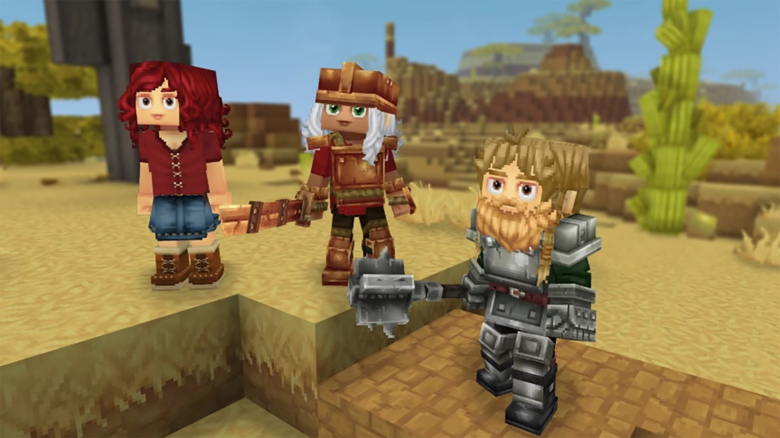
You gain access to a wider range of avatar options designed to increase visual variety without changing gameplay function. New face coverings include bandit-style masks with an optional side knot, multiple blindfold styles, and bandaged eye variants that can sit over either eye or both.
Facial expression choices expand with three additional mouth styles: vampire, cute, and orc. These options allow you to fine-tune tone and personality during character creation or later edits.
Hair visuals received targeted updates rather than full redesigns. Styles such as Single Side Pigtail, Hair Stick Bun, Simple Bobcut, Fighter Buns, Smart Elven, and Windswept now render with cleaner shapes and improved texture consistency.
Color selection also improves. Fantasy cotton cosmetics now include a white color option, which supports cleaner contrasts when paired with darker armor or accessories.
Armor visibility controls appear directly in the character panel. You can toggle individual armor slots on or off without unequipping items. Server owners can lock these options to preserve PvP balance or roleplay immersion.
Cape animations now respond more smoothly to player movement. When you sprint, capes flow with fewer rigid transitions, reducing visual snapping during rapid direction changes.
Combat, Crafting, and Progression Changes
You can now obtain an item that raises skeletal allies from nearby bone piles. This item drops from the large Praetorian Skeleton and introduces a controlled form of minion-based combat without altering existing class systems.
Mining progression has been restructured to reinforce tool hierarchy. Adamantite nodes now require at least a Thorium or Cobalt pickaxe. Lower-tier tools still function but deal sharply reduced damage to high-tier ores.
Upgrading your pickaxe now has a clear impact. Each quality jump reduces the number of strikes needed, making progression feel more deliberate and less grind-driven.
Several balance adjustments target creatures and drops. Polar Bears now deal more damage and pose a greater threat in cold regions. The Magma Toad received a rework that lowers tongue attack damage and alternates it with a new headbutt ability.
Hide drops have been standardized across larger animals. The following creatures now yield Medium Hide instead of Light Hide:
| Creature |
|---|
| Bison |
| Boar |
| Cow |
| Horse |
| Warthog |
Decorative crafting expands through the furniture bench. You can craft additional light sources, improving base-building options without relying on rare materials.
Petal items move into the Textiles category and become fully renewable. You can grow sunflowers for yellow petals, then use crafting to convert them into other colors. Lighter cloth block variants now require petals, making color variation a part of farming rather than exploration luck.
Terrain Systems and World Layout
World generation systems move forward with the preparation of WorldGen V2 for public reference. This documentation helps you and modders understand placement logic, biome rules, and structure handling.
Two new templates—Default_Flat and Default_Void—now rely on the updated generation framework. These templates provide cleaner baselines for creative builds and testing environments.
The Creative Hub Portal now spawns using V2 flat generation when you create a new creative world. This setup ensures clear weather and reduced fog, improving visibility for large-scale construction. Existing creative worlds do not retroactively change.
Ore distribution has undergone a major refactor across all zones. You must explore newly generated chunks in older worlds to see these changes. Underground regions, especially within the Devastated Lands, now contain higher ore densities and more consistent vein placement.
These adjustments aim to reduce long stretches of unproductive mining while preserving regional differences in resource availability.
Crop Growth and Tool Progression
Farming systems now protect long-term builds from accidental loss. Eternal crops no longer break when struck by weapons, which prevents unintended destruction during combat or harvesting mistakes.
Tilled soil lasts longer before degrading. The lifetime now ranges between 1.2 and 1.5 in-game days, reducing maintenance pressure on large farms.
Soil under fully grown crops no longer decays. This change removes the need to constantly re-till mature plots.
You can now hold a torch in your offhand while using hoes or planting seeds. This makes nighttime farming safer and removes the need to constantly swap items.
Breaking a fully grown Eternal crop now returns its seeds. You can replant immediately without relying on extra stock.
When you crouch, you can place harvested crops directly on the ground. This supports decorative farming layouts and manual sorting.
Hoe crafting progression has been reorganized. Recipe costs now scale more evenly, and tools unlock at different farming bench tiers:
| Material | New Tier |
|---|---|
| Copper | Tier 2 |
| Iron | Tier 4 |
| Thorium | Tier 6 |
This structure aligns farming tools more closely with early, mid, and late-game progression.
Interface and Interaction Improvements
Tooltips across the editor now use clearer descriptions. When you hover over color options in avatar customization, the UI displays the actual color name instead of relying on visual guesswork.
Hotbar visibility improves through higher contrast and a diamond-shaped active slot indicator. You can more easily track your selected item in bright biomes such as the Howling Sands.
Memory categories accessed through The Heart of Orbis now sort alphabetically. This change reduces scrolling time when managing large collections.
Scripted brush tools received multiple quality-of-life updates. Filters now include missing entries, remove invalid blocks, and eliminate redundant brushes. Decoration and cave brushes have been added, while existing bugs were resolved.
The JumpIfBlockType node now uses a single offset value instead of a list, simplifying logic for creators who rely on scripted tools.
Inventory interaction feels more responsive. Faster double-click handling reduces misfires, and Shift-clicking armor equips it directly when the slot is empty.
Quick-action shortcuts now support Q, E, R, T for common tasks like sorting and stacking. Tooltips display these shortcuts when you hover over the buttons.
An optional FPS counter overlay appears under General > User Interface. When enabled, it shows your current frame rate in the top-right corner.
Player markers received several refinements. You now see markers on the compass, player names always render on the map, and height differences display with up or down indicators. Toggle controls let you hide or show map and compass visibility per player.
Accessibility options expand with Ophidiophobia Mode, which replaces snake models with hatworms. You can enable it under Gameplay > Accessibility.
Sound Design and Visual Feedback
Missing baseline sound effects for Rex creatures have been added, ensuring consistent audio feedback during encounters.
The inventory sound for dragging and dropping bones has been updated to better match material weight.
A cave music track in the Howling Sands received a fix to address playback issues.
Food particle effects now use updated color tints. This change improves visual clarity when cooking or consuming items, especially in low-light environments.
Stability, Performance, and Technical Fixes
Server management gains a built-in auto-update system. A new UpdateModule core plugin integrates directly into the server startup process, allowing automated checks, downloads, and staged deployments.
You can configure update behavior through a dedicated update configuration section. Options include check intervals, notification rules, patchline selection, backups, and auto-apply modes.
Servers now use a specific shutdown reason when restarting for updates. New /update commands provide clear status messages for administrators and notify players when changes require a restart.
The release workflow now includes launcher scripts for both Windows and Linux, simplifying setup.
Rendering shadows received targeted fixes to resolve long-standing visual issues. Weather transitions now blend more smoothly, reducing abrupt lighting changes.
Creative mode block picking works correctly when your hotbar is full. Middle-clicking replaces the current slot instead of failing.
The Asset Editor now shows documentation directly in tooltips, reducing the need to reference external guides.
Mantling detection has been corrected to prevent unintended movement behavior. Cleared keybinds now persist between sessions.
Teleporters apply a positional offset to avoid collision issues on arrival. Rail carts now consume properly and place as expected.
Bed respawning functions correctly even when chunks are unloaded. Collision checks no longer fail due to missing loaded chunks.
Additional fixes address oversized placement previews, haircut texture tiling, cosmetic color bleed on glasses, and water refilling behavior.
Permissions now control world map teleporting, and server-side validation prevents unauthorized packet-based teleport attempts.