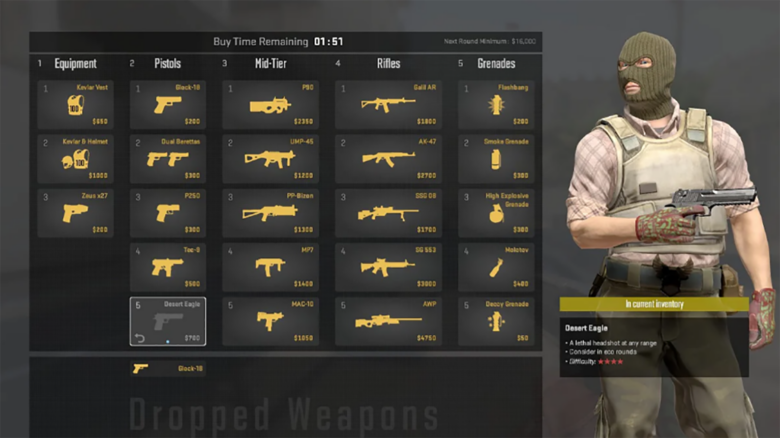
CS2 rewards more than mechanical aim, and you gain an advantage when you understand how money shapes every round. The in-game economy controls which weapons and utility you can access, based on the cash you earn from objectives and performance.
You improve your consistency when you read both your team’s funds and the opposing side’s budget. A clear grasp of the economy helps you anticipate enemy equipment and choose buys that support stronger round outcomes.
Core mechanics of the CS2 money system
You operate within a round-based cash cycle that directly affects your buying power. Each match starts with $800 per player, which shapes the pistol round and early momentum. You usually prioritize light armor to reduce aim punch, then adjust with utility based on your role and team plan.
Money shifts every round through a mix of eliminations, objectives, and round outcomes. You need to track both your balance and the opposing team’s likely funds to plan buys, saves, or force rounds.
Income from eliminations
Every kill adds money to your account, but the amount changes by weapon type. High-risk weapons tend to pay more, while powerful rifles reward less to limit snowballing. Competitive mode uses the values below.
| Weapon category | Cash per kill |
|---|---|
| Knife | $1,500 |
| Pistols | $300 (CZ-75: $100) |
| SMGs | $600 (P90: $300) |
| Shotguns | $900 (XM1014: $600) |
| Rifles / LMGs | $300 (AWP: $100) |
| Grenades | $300 |
| Zeus x27 | $100 |
You should factor these rewards into force-buy decisions. SMGs and shotguns can rapidly rebuild your economy when you expect close-range fights.
Payouts for winning the round
Round results deliver the largest cash swings. A standard win by elimination pays $3,250 per player. A successful bomb plant that leads to a win increases that amount to $3,500 for everyone.
Objective bonuses add extra income:
- Bomb plant bonus: $300 for the planter
- Bomb defuse bonus: $300 for the defuser
- Plant in a lost T round: $800 for each Terrorist
You should value bomb plants even in likely losses. That extra $800 often enables rifles or utility in the following round and stabilizes your team economy.
What is the loss bonus in CS2?
The loss bonus defines how much money you receive after losing a round. It exists to soften economic collapse when your team drops multiple rounds in a row. Without it, early losses would lock you into repeated low-buy rounds with limited recovery options.
CS2 increases your payout as losses stack. You start at $1400 after a single loss, then gain an extra $500 for each consecutive loss. A win reverses that progress by reducing the bonus by $500, which forces you to plan purchases carefully instead of relying on constant maximum income.
This system raises the strategic value of early rounds. Pistol rounds and follow-up conversions shape not only momentum but also how quickly you can reach stable full buys. Poor timing can leave you stuck between weak force buys and inefficient saves.
You can always check your current loss bonus in-game. Press Tab and look to the right side of the scoreboard, where CS2 shows a meter from 0 to 4. That value determines your next-round payout after a loss.
| Loss Bonus Meter | Money After Loss |
|---|---|
| 0 | $1400 |
| 1 | $1900 |
| 2 | $2400 |
| 3 | $2900 |
| 4 | $3400 |
The meter begins at 1 when the match starts. You calculate your reward by adding $500 × meter value to the base $1400. At its cap, the loss bonus pays $3400, which supports full utility and rifles even during losing streaks.
Buy Patterns You Use in CS2
1. Complete Loadout Buy
You take a complete loadout buy when your money allows rifles, armor, and a solid set of grenades without compromise. This choice usually appears when you hold roughly $5,000 or more, depending on side and role.
On the T side, you typically invest in an AK‑47, armor, and several grenades. You can often stay just under the $5,000 mark and still feel well equipped. On the CT side, costs rise because rifles, defuse kits, and utility stack up quickly.
Key considerations during a complete loadout buy:
- Prioritize rifles over luxury utility
- Adjust grenade selection based on map and role
- Skip helmets only when enemy weapons make them irrelevant
This buy type aims to give your team maximum round-winning potential with minimal economic risk.
2. Limited Investment Buy
You use a limited investment buy when you lack the funds for a full setup but want to remain competitive. The focus stays on spending just enough to fight while protecting your next round.
Instead of rifles, you often choose:
- SMGs or pistols with higher damage potential
- Light utility, such as a single flash or smoke
- Armor without overcommitting
Your goal centers on creating pressure, securing a few kills, or forcing the enemy to rebuy. You accept a lower chance to win the round in exchange for a stronger position later.
Common limited-buy priorities
| Priority | Reason |
|---|---|
| Armor | Increases survival time |
| One key grenade | Enables basic tactics |
| Affordable weapon | Keeps future economy intact |
3. High-Risk Force Investment
You make a high-risk force investment when saving offers little strategic value. This approach appears most often in three clear scenarios tied to match flow and economy timing.
You force when:
- The half is ending and saved money would go unused
- The opponent also shows signs of a weak purchase
- Another save would still leave you broke next round
These rounds rely on aggression, coordination, and momentum rather than perfect gear. You trade economic stability for the chance to steal a round and disrupt the opponent’s rhythm.
Force investments often include:
- Shotguns, SMGs, or downgraded rifles
- Partial utility instead of full grenade sets
- Creative positioning and early fights
4. Full Save Round
You commit to a full save when any purchase would damage your future economy. This decision requires discipline and clear communication.
Instead of focusing on the current round, you calculate what you will have next. If buying now prevents a proper loadout later, you spend nothing or almost nothing.
During a save, you typically:
- Avoid unnecessary engagements
- Stack bombsites or play close angles
- Look for low-risk weapon upgrades
The purpose of a save round stays simple: protect your economy so the following round gives you real winning tools.
How to predict the opponent’s buy in CS2
You read the opponent’s buy by tracking money flow across rounds, not by guessing weapons in isolation. Start with the previous round: note what they purchased, what they saved, and how many players survived with gear.
The scoreboard gives you fast signals. You can see loss bonus progression, surviving players, and round outcomes without pausing play. As CT, always account for whether the Ts planted the bomb, because that cash injection often changes the next round.
Kills matter as much as wins. Multiple rifle kills or SMG farming can quietly stabilize a weak economy, while low-impact rounds keep teams fragile. Weapon type also matters, since saving rifles or an AWP shifts future buys more than pistols.
Use practical patterns to narrow outcomes. A first-round bomb plant usually leads to a force buy next round. If they skip that force, expect a stronger third-round purchase, often including an AWP.
When a team strings together losses without meaningful saves, you should anticipate an eco or low-utility buy. One more loss in that state often forces another save. By contrast, winning an eco while saving weapons can fund two competitive rounds.
Quick indicators you can rely on:
| Situation you observe | Likely opponent buy |
|---|---|
| Bomb plant on pistol | Force buy next round |
| No force after plant | Full buy on round three |
| Few survivors, low kills | Eco or light buy |
| Eco win with saved guns | Two solid buys |
You will not calculate exact dollars mid-round. With experience, you develop a timing sense that turns these indicators into fast decisions. Combine them, and you reduce uncertainty around what you are about to face.