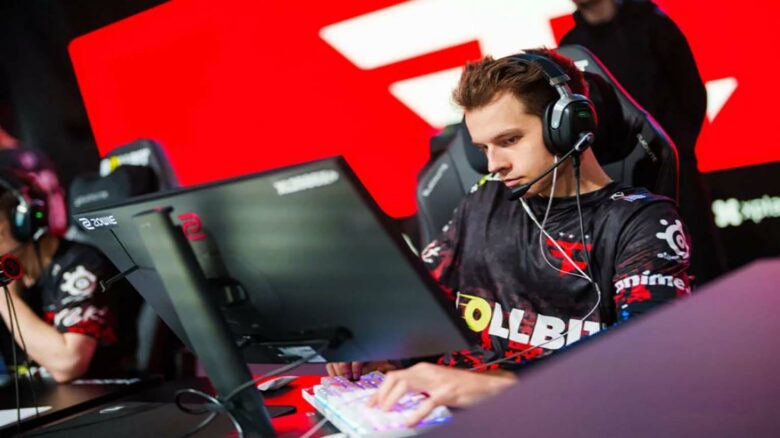
You likely know David “frozen” Čerňanský as a player who entered top-level Counter-Strike at a young age and never left the elite scene. By his early twenties, he had already built years of Tier 1 experience that shaped a consistent and disciplined playstyle.
That background explains why you see so much interest in frozen’s CS2 settings today. You can look to his setup as a practical reference developed through long-term professional play rather than short-term trends.
frozen CS2 Settings
frozen CS2 Mouse Control Setup
You use a low, controlled sensitivity that favors precision over rapid flicks. This approach suits a rifler who holds angles and plays lurk-heavy positions.
| Setting | Value |
|---|---|
| Mouse | Razer DeathAdder V4 Pro (Black) |
| DPI | 400 |
| Sensitivity | 2.0 |
| eDPI | 800 |
| Zoom Sensitivity | 0.8 |
| Polling Rate | 4000 Hz |
| Windows Sensitivity | 6 |
This setup keeps micro-adjustments consistent while reducing overcorrection during sprays.
frozen CS2 Crosshair Configuration
You run a static crosshair that stays clean and predictable. The design avoids visual noise and keeps the center easy to track during fights.
Crosshair Code: CSGO-J76WS-DiJ5B-BeD2T-afhqm-xKn2H
- Style: Classic Static
- Follow Recoil: No
- Dot: Disabled
- Length / Thickness: 1 / 1
- Gap: -4
- Outline: Off
- Color (RGB): 0 / 255 / 120
- Alpha: Enabled (255)
The compact size helps you place shots without blocking distant targets.
frozen CS2 Weapon View Position
You keep the viewmodel close to default, prioritizing familiarity. Minor offsets provide a clear sightline without shifting focus from the crosshair.
| Command | Value |
|---|---|
| FOV | 68 |
| Offset X | 2.5 |
| Offset Y | 0 |
| Offset Z | -1.5 |
| Preset | 3 |
This balance maintains visibility while minimizing distractions.
frozen CS2 Startup Parameters
You apply launch options that stabilize performance on high-refresh setups. These commands focus on networking and frame consistency.
-freq 360+rate 786432+fps_max 500-tickrate 128
They help your system match competitive standards.
frozen CS2 Display Resolution Choices
You play on a stretched 4:3 format to enlarge player models. This choice emphasizes target visibility.
- Resolution: 1280×960
- Aspect Ratio: 4:3
- Scaling: Stretched
- Display Mode: Fullscreen
- Brightness: 100%
The result favors clarity over visual fidelity.
frozen CS2 Advanced Graphics Tuning
You tune visuals for responsiveness rather than aesthetics. Effects that add latency stay disabled.
- Boost Player Contrast: Enabled
- V-Sync / G-Sync: Disabled
- NVIDIA Reflex: Enabled
- MSAA: 4x
- Shadows: High (Dynamic: All)
- Textures: Medium
- Shaders / Particles: Low
- Ambient Occlusion: Medium
- HDR: Quality
- FSR: Disabled
This configuration keeps frames stable in heavy fights.
frozen CS2 Interface Layout
You slightly reduce HUD size to free screen space. Team-based coloring keeps information readable.
- HUD Scale: 0.95
- HUD Color: Team Color
frozen CS2 Radar Preferences
You rely on a rotating, player-centered radar. Zoom and size balance map awareness with screen coverage.
- Centered Radar: Yes
- Rotation: Yes
- HUD Size: 0.903239
- Map Zoom: 0.4
- Shape Toggle with Scoreboard: Enabled
frozen CS2 Hardware and Peripherals
You use tournament-proven gear built for consistency and comfort.
- Mouse: Razer DeathAdder V4 Pro Black
- Mousepad: Odin Gaming Andromeda Pro
- Monitor: ZOWIE XL2566K
- Keyboard: SteelSeries Apex Pro TKL Gen 3 (White)
- Headset: SteelSeries Arctis Nova Pro
frozen CS2 FAQs
You often see frozen referenced by his in-game name, but his legal name is David Čerňanský.
You can place his age at 23, based on his July 18, 2002 birthday.
You will find his roots in Slovakia, where he began building his professional Counter-Strike career.
You currently watch him compete under the FaZe Clan banner in CS2 events.
| Detail | Information |
|---|---|
| Current team | FaZe Clan |
| Former team | MOUZ |
| Country | Slovakia |
| Age | 23 |
You should not expect regular live broadcasts from him, as he does not stream CS2 on Twitch.
You instead track his performances through official matches and tournament coverage.
You can mirror his mouse setup if you prefer low sensitivity control.
He plays with 400 DPI and 2.0 in-game sensitivity, which results in an 800 eDPI.
- Resolution: 1280×960
- Aspect ratio: 4:3 stretched
- Style focus: consistent aim and stable rifling
You can copy his current crosshair using this code:
CSGO-J76WS-DiJ5B-BeD2T-afhqm-xKn2H
You can also access his Steam profile and inventory directly through the official Steam platform.