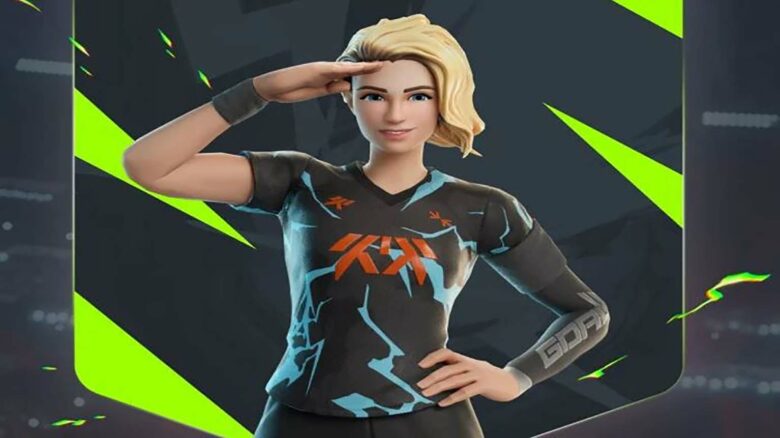
Epic Games has partnered with GOALS to introduce the new Goal Getter skin in Fortnite, giving you a chance to unlock it without spending any V-Bucks. The promotion celebrates the global launch of GOALS, a free-to-play football title now available on PC, PlayStation 5, and Xbox Series X|S.
If you want to add this limited-time outfit to your locker, you need to understand how the crossover works and what steps you must complete. This guide outlines the key details so you can secure the GOALS skin while the offer is available.
How to Unlock the Free GOALS Skin in Fortnite
You can secure the Goal Getter outfit at no extra cost by purchasing any eligible GOALS add-on or coin bundle through the Epic Games Store. The promotion links your GOALS purchase directly to your Fortnite account.
Buy one of the following coin packs to qualify:
- GOALS – 1,150 Coins
- GOALS – 2,350 Coins
- GOALS – 3,600 Coins
- GOALS – 6,100 Coins
- GOALS – 13,500 Coins
Complete the checkout process on the add-on page, and Epic will register your purchase automatically. You do not need to redeem a separate code.
Your Goal Getter skin will appear in your Fortnite locker on June 18, 2026 at 8 PM ET. Make sure you use the same Epic account for both GOALS and Fortnite to avoid delivery issues.
If you prefer not to buy a GOALS add-on, you can purchase the outfit directly from the Fortnite Item Shop starting June 18 for 1,500 V-Bucks.
| Option | Cost | Notes |
|---|---|---|
| Buy GOALS coin pack | Varies | Skin included at no extra charge |
| Buy in Item Shop | 1,500 V-Bucks | Standard cosmetic purchase |
If you purchase the skin first and later buy a qualifying GOALS add-on, Epic refunds the 1,500 V-Bucks to your account.