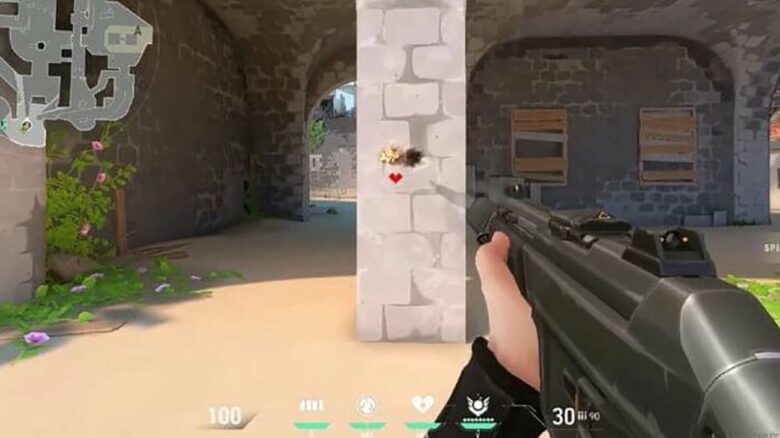
You can add personality to your Valorant matches by switching to a cute crosshair design instead of a standard competitive reticle. These custom codes let you replace simple lines and dots with playful shapes that stand out on your screen.
In 2026, many players use adorable crosshair styles to bring a lighter touch to the game while keeping full control of their aim. With the right code, you can turn your reticle into a design that reflects your style without changing core gameplay mechanics.
How to Apply Cute Crosshair Codes in Valorant
You can add any custom design by importing its code directly into the in-game settings. Open Settings → Crosshair → Import Profile Code, paste the full string, and confirm.
If you prefer manual control, enter each value under the crosshair tabs instead of importing. When a design uses different vertical and horizontal line lengths, turn off the small chain icon so you can adjust each axis independently.
Test every design in The Range before using it in a live match. Dynamic or animated elements may shift while shooting, so confirm visibility and accuracy during recoil and movement.
Baby Chick (Duck) Reticle Code
This design forms a small face with two eyes and a beak-like mouth that reacts to firing accuracy. It works best with a bright yellow tone to resemble a chick.
Import Code:
0;P;0t;10;0l;0;0v;2;0g;1;0o;0;0e;0.168;1t;8;1l;10;1v;0;1g;1;1o;17;1a;1;1m;0;1f;0
Tips for use:
- Keep outlines enabled for better contrast.
- Use a light background map in The Range to confirm visibility.
- Adjust opacity if the center feels distracting.
Smiling Face Reticle Code
This setup reshapes the standard crosshair into a tilted smile. It adds personality while keeping a defined aiming center.
Import Code:
0;P;c;7;t;2;o;1;d;1;z;3;a;0;f;0;0t;10;0l;2;0o;2;0a;1;0f;0;1b;0
Best practices:
- Lower inner line thickness if the “smile” looks too heavy.
- Disable movement error if you want a steady expression.
- Use it in casual modes first to judge comfort.
Pink Heart Reticle Code
This heart-shaped design uses layered lines and color settings to create a clear heart form. You can keep the pink tone or switch to another color without changing the shape.
Primary Import Code:
0;c;1;s;1;P;c;8;u;F97AC0FF;h;0;d;1;b;1;z;3;f;0;m;1;0t;4;0l;1;0o;2;0a;1;0f;0;1t;3;1l;1;1o;2;1a;1;1m;0;1f;0;S;b;1;c;8;t;F97AC0FF;s;0.823;o;1
Alternate Version:
0;P;c;8;u;F97AC0FF;h;0;d;1;b;1;z;3;f;0;m;1;0t;10;0l;0;0v;3;0g;1;0o;1;0a;1;0f;0;1t;9;1v;0;1g;1;1o;3;1a;1;1m;0;1f;0
Adjustment suggestions:
- Change the hex color value to personalize the heart.
- Keep firing error enabled if you want slight movement animation.
- Increase outline thickness for darker maps.
Floral-Inspired Reticle Code
This layout shapes the crosshair into a simple flower pattern. It balances decoration with a visible central aim point.
Import Code:
0;P;c;6;o;1;d;1;z;4;f;0;m;1;0t;8;0l;3;0o;2;0a;0;0f;0;1l;3;1o;3;1a;0;1m;0;1f;0
Setup notes:
- Disable the center dot if the flower feels crowded.
- Test recoil spread to ensure petals do not block vision.
- Keep opacity above 0.8 for clarity.
Wobbly Eyes Reticle Code
This playful design resembles two moving eyes. It uses spacing and opacity settings to create a shifting look while firing.
Import Code:
0;c;1;s;1;P;t;4;o;1;d;1;z;5;a;0.556;0t;10;0l;20;0v;0;0g;1;0o;13;0a;1;0f;0;1t;1;1l;1;1v;0;1g;1;1o;14;1a;1;1s;0.064;1e;0.375;S;c;0;s;0.628;o;1
Before using in matches:
- Watch how the eyes react during spray control.
- Lower outer line length if the design feels too wide.
- Confirm that the center remains easy to track.
Crewmate-Style Character Reticle Code
This design forms a small character silhouette inspired by a well-known party game. It keeps a compact shape while remaining recognizable.
Import Code:
0;P;c;7;t;3;o;1;0t;4;0l;5;0o;0;0a;1;0f;0;1t;8;1l;3;1o;0;1a;1;1m;0;1f;0
Usage guidance:
- Use static settings for consistent aim.
- Increase inner line thickness if the character shape fades on bright maps.
- Avoid excessive opacity reduction.
Food-Inspired Reticle Codes
Food-themed crosshairs rely on layered lines and color values to create recognizable shapes. They work best in non-competitive modes where visual clarity matters less than style.
When importing any food-based design:
- Paste the full code without edits.
- Check color contrast against common map backgrounds.
- Test hip-fire and ADS behavior in The Range.
Keep inner line length moderate to avoid blocking enemy models.
Hamburger Reticle Code
This design stacks multiple line layers to resemble a burger with bun and filling details. It uses color, thickness, and spacing settings to build the layered effect.
Import Code:
0;P;c;8;b;1;t;2;o;1;z;2;a;1;0t;10;0l;3;0v;3;0o;3;0a;1;0s;1;0e;1;1t;2;1l;2;1v;2;1o;10;1a;0.35;1s;1;1e;1;u;FFFFFF;d;1;h;1;0g;0;1g;0;0f;0;1f;1;0m;0;1m;1;0b;1;1b;0;m;0;f;0
Optimization checklist:
- Confirm the center remains visible during recoil.
- Adjust brightness if the bun color blends into sandy maps.
- Use it in Swiftplay or custom matches before ranked.
You control how playful or practical your crosshair feels. Import the code, fine-tune the values, and verify performance in The Range before committing to competitive play.
More Creative Crosshair Picks for 2026
Social Media Camera Icon Reticle
You can mirror the well-known camera-style social platform logo with this clean, rounded setup. It uses layered lines and a centered structure to resemble the familiar app symbol while staying usable in casual matches.
Import Code:
0;P;c;6;h;0;d;1;z;1;f;0;s;0;0t;4;0l;1;0o;2;0a;1;0f;0;1t;10;1l;1;1o;5;1a;1;1m;0;1f;0
- Modern, symmetrical layout
- Works best with static firing error
- Suits unrated and custom games
First Aid Kit Inspired Reticle
This design forms a plus-style symbol that resembles a medical pack. You get a bold center shape that stands out clearly against most maps.
Import Code:
0;P;c;7;h;0;f;0;0t;6;0l;1;0o;0;0a;1;0f;0;1t;10;1l;1;1o;5;1a;1;1m;0;1f;0
Key traits:
- Strong central visibility
- Balanced vertical and horizontal lines
- Practical for short-range fights
Console Sphere Emblem Reticle
You can display a circular emblem inspired by a popular gaming console brand. The intersecting lines create a recognizable split design while keeping the center readable.
Import Code:
0;P;c;1;h;0;0t;1;0l;2;0o;1;0a;1;0f;0;1t;3;1l;1;1o;2;1a;1;1m;0;1f;0
This layout stays compact, so it does not block your target during mid-range duels.
Purple Duelist Focus Reticle
This violet-themed setup reflects the visual style associated with Reyna’s ability effects. You can use it as a visual cue to activate abilities before taking site control.
Import Code:
0;P;c;6;t;6;o;0.3;f;0;0t;1;0l;5;0o;5;0a;1;0f;0;1t;10;1l;4;1o;5;1a;0.5;1m;0;1f;0
- Bright purple color
- Noticeable outer lines
- Suitable for aggressive entries
Rotating Windmill Style Reticle
This oversized pattern spreads outward like blades, creating a spinning visual effect when you move or fire. It clearly shows movement and firing inaccuracy, which makes it better for relaxed modes.
Import Code:
0;P;c;7;t;2;o;1;d;1;z;3;f;0;0t;10;0l;2;0o;2;0a;1;0f;0;1b;0
You should avoid this design in ranked play since its large shape can distract you in tight gunfights.
Simple Cute Crosshair Alternatives
Minimal Plus-Style Reticle
You can use a clean plus-shaped reticle if you want a cute look without clutter. It keeps the classic cross layout but trims extra visual elements for a lighter feel.
- Style: Simple cross with balanced spacing
- Best for: Players who want clarity with a soft aesthetic
- Import Code:
0;P;c;7;h;0;f;0;0l;4;0o;2;0a;1;0f;0;1t;8;1l;1;1o;1;1a;1;1m;0;1f;0
This setup helps you stay precise while keeping your screen visually clean.
Clean Line Precision Reticle
Choose this option if you prefer smooth, refined aiming lines. It reduces visual noise and keeps the center area easy to track during fights.
- Style: Thin, polished lines with a steady look
- Best for: Controlled aim and consistent tracking
- Import Code:
0;P;h;0;f;0;m;1;0l;3;0o;2;0a;1;0f;0;1t;8;1l;1;1o;2;1a;1;1m;0;1f;0
You get a balanced reticle that feels stable without distracting details.
Reasons to Choose Cute Crosshairs in Valorant 2026
Cute crosshairs let you show personality and stand out in your matches. You move beyond standard minimal designs and give your HUD a style that reflects your taste.
You can still maintain solid accuracy while using playful shapes such as hearts, animals, or meme-inspired reticles. Many players switch to simpler setups for ranked games and return to creative designs in casual modes.
- Show individuality in every lobby
- Enjoy flexible customization with easy import codes
- Swap styles quickly depending on the mode you play
Smart Tips for Using Cute Crosshair Designs
Test every cute crosshair in the Practice Range before you bring it into ranked matches. Animated or reactive elements can shift while you fire, move, or spray, and screenshots rarely show how they behave in real time.
Focus on how the design performs during common actions:
- Spraying at medium range
- Tracking moving bots
- Holding tight angles
If a duck, heart, or smiley design distracts you or blocks head-level sightlines, adjust size, thickness, or opacity. Valorant’s 2026 crosshair settings give you strong customization control, so refine each detail until it supports your aim instead of competing with it.