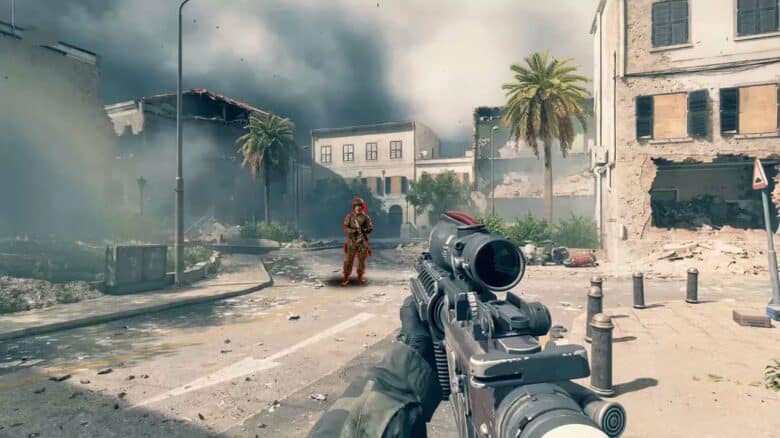
Battlefield 6 has faced ongoing criticism for its visibility challenges, which stem from dense environmental effects and large-scale battles. Many players have found that these conditions make it difficult to distinguish opponents in the midst of combat, especially under varying weather and lighting conditions.
To address this, the game offers several visual customization options that help improve clarity. Adjusting brightness levels, icon design, and other display elements can make a noticeable difference. Among these settings, the Soldier Visibility (SOVIS) filter has gained attention as a key tool for improving how easily players can identify enemy soldiers across complex maps.
Battlefield 6's Soldier Visibility Filter Can Help Spot Enemies
The Soldier Visibility Filter (SOVIS) in Battlefield 6 changes how lighting interacts with character models. By removing the game’s realistic lighting, fog, and dust effects from operators, it makes soldiers easier to distinguish from the environment. This adjustment helps players identify opponents more quickly, especially in maps with heavy visual clutter or low light.
Unlike many graphical tweaks that can reduce performance, SOVIS shows little to no measurable impact on frame rate. Players can keep smooth gameplay while gaining clearer target visibility. The feature’s design focuses on function over realism, appealing to those who prioritize competitive awareness rather than cinematic presentation.
The effect is somewhat comparable to contrast-enhancing tools seen in other shooters. For instance, Counter-Strike 2 uses a “Boost Player Contrast” option that highlights enemy silhouettes against backgrounds. Battlefield 6 applies a similar concept globally, making all operators stand out regardless of motion or position.
Some players prefer to disable the filter, arguing that it can produce overly bright or washed-out visuals. This trade-off between clarity and immersion means the best setting depends on individual preference. Testing the filter across multiple maps and lighting conditions helps determine whether it enhances or hinders performance in specific scenarios.
| Feature | Details |
|---|---|
| Developer | Battlefield Studios |
| Publisher | Electronic Arts |
| Release Date | October 10, 2025 |
| Platforms | PlayStation 5, Xbox Series X |
| Cross-Play | Supported |
| Cross-Save | EA Account |
| File Size (Xbox Series) | 87.44 GB |
| Rating | Mature 17+ |
| Steam Deck Support | Not Supported |
| **Optimized for X | S** |
Steps to Enable the SOVIS Filter
Players can turn on the Soldier Visibility Filter through the in-game settings. The process involves only a few steps and can be done mid-session without restarting the game.
- Open the Settings menu.
- Navigate to the Graphics section.
- Scroll to the HUD and Interface category.
- Locate the SOVIS toggle and switch it on if it isn’t already active.
Once enabled, the change takes effect immediately. Players should monitor how lighting and visibility shift in different environments to decide if the filter suits their preferred playstyle.