Fortnite continues to expand its cosmetic and interactive features, allowing players to express themselves through more than just character skins and outfits. The Sidekick system brings this personalization to a new level, introducing AI companions that move, react, and display unique behaviors alongside players in various game modes.
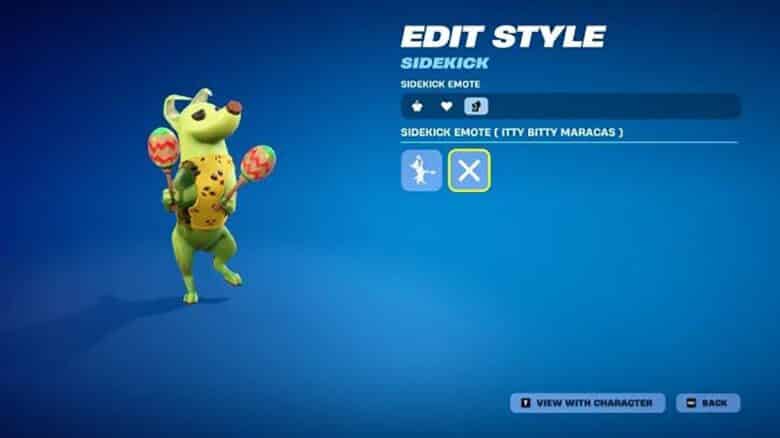
Among its standout features is the Sidekick Emote, which enhances in-game expression by letting players interact directly with their companions. This mechanic blends customization with creativity, giving users another way to showcase their style and personality within Fortnite’s evolving environment.
What are Sidekick Emotes?
Sidekick Emotes are unique companion animations that let each Sidekick express distinct behaviors during gameplay.
They differ from standard emotes by focusing on interactive and character-specific movements.
Players can trigger them to see their Sidekick perform playful or thematic actions, highlighting the companion’s personality and deepening team interactions in Battle Royale and other modes.
How to Use Sidekick Emote in Fortnite
Players can activate the Sidekick Emote after assigning it through the in‑game Locker. From the Sidekicks tab, they choose which companion to equip, press Edit, and link the emote to their preferred control input. This setup ensures that the animation can be used quickly during matches or lobby sessions.
Platform controls vary:
| Platform | Activation Method |
|---|---|
| PC | Scroll the mouse wheel downward |
| Console | Double‑tap R2 |
When used, the equipped Sidekick performs an animation that responds directly to the player’s gesture. The emote works in several Fortnite experiences, including Battle Royale, LEGO Fortnite, and user‑created islands.
Because it is purely cosmetic, the Sidekick Emote does not grant gameplay benefits. Players often use it for social interactions, casual moments, or post‑match celebrations, adding a layer of personality to their character without affecting performance.