The release of the StarLadder Budapest Major 2025 has introduced a new feature to Counter-Strike 2 that has caught the attention of players and collectors alike. Alongside the event’s traditional content, Valve added the Sticker Slab, a system that changes how stickers interact with weapons and inventories.
This update has sparked discussion within the community, as many wonder how the feature might influence the value and trading dynamics of in-game stickers. While its long-term impact remains to be seen, the addition marks a notable shift in how cosmetic items function within CS2.
What is the CS2 Sticker Slab?
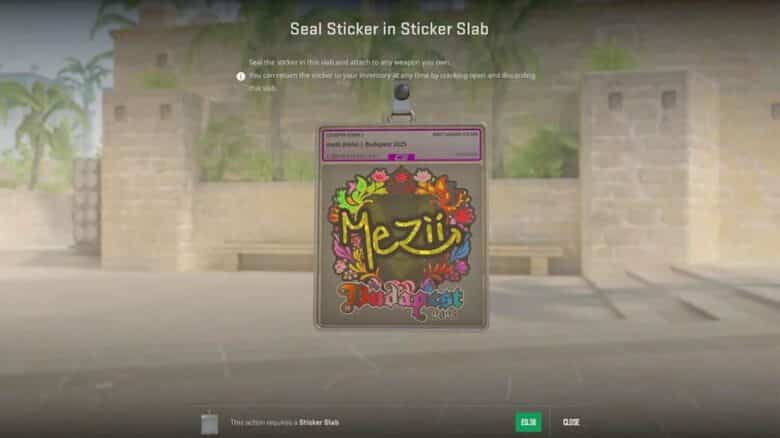
The CS2 Sticker Slab functions as a display charm that lets players place a sticker inside a transparent case and attach it to any weapon. Unlike traditional stickers, the item keeps the original intact, allowing users to remove it later and reuse it as a normal sticker.
This system offers flexibility for collectors who prefer not to permanently apply rare or valuable stickers.
Players can use any sticker with a slab, regardless of its release or rarity.
| Feature | Description |
|---|---|
| Purpose | Show a sticker as a weapon charm |
| Reusability | Stickers can be removed and reapplied |
| Compatibility | Works with all sticker types |
| Benefit | Preserves sticker value while allowing display |
How to use the CS2 Sticker Slab
Players can convert any sticker into a Sticker Slab through their inventory. To begin, they open the inventory, select a sticker, and choose Seal in Sticker Slab. The process requires purchasing a slab for $0.49 before confirming the seal.
Once sealed, the sticker functions like a weapon charm and can be attached to any gun.
To remove it, players can detach the sticker at any time, but the slab itself is single-use.
| Action | Result |
|---|---|
| Seal sticker | Creates a displayable charm |
| Remove sticker | Slab disappears; sticker returns to inventory |