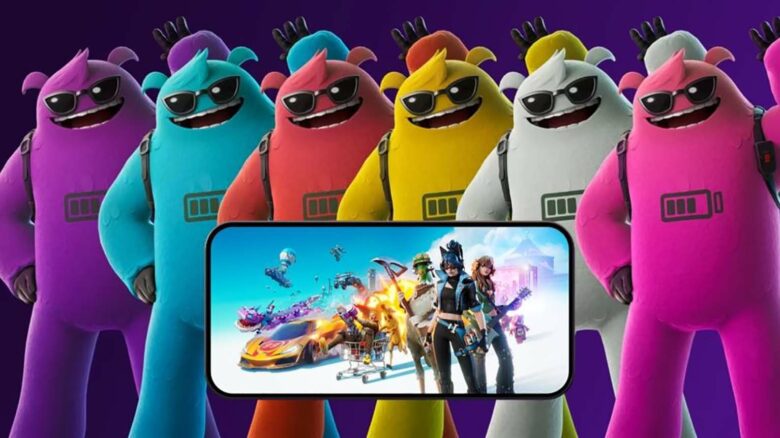
Epic Games has brought Fortnite back to iOS in most regions after winning its legal battle with Apple, and you can now jump back in on your iPhone or iPad. To mark the game’s return, Epic is giving you the Yeddy skin at no cost when you complete a simple in-game quest.
Yeddy is not a brand-new outfit, but its availability on iOS gives you another chance to add it to your locker. You only need to meet the quest requirement on mobile to unlock it.
Unlock the Yeddy Skin on iOS at No Cost
You can claim the Yeddy outfit on iOS by completing a simple in-game requirement. Follow the steps below to secure it on your account.
- Install Fortnite from the iOS App Store if it is not already on your device.
- Sign in with your Epic Games account.
- Play matches until you gain one full account level.
- After leveling up, check for the in-game notification confirming Yeddy is now in your Locker.
Leveling up only requires earning enough XP to move up a single level. You can speed this up by focusing on high-XP activities during matches.
Effective ways to earn XP quickly:
- Complete available Quests
- Eliminate opponents
- Survive Storm phases
- Open Chests and interact with objectives
If your account sits at a higher level, expect the grind to take slightly longer. XP requirements increase as your level rises, so progressing may require more matches than it would for a newer account.
Once you hit the required level, the skin unlocks automatically. You do not need to purchase anything or complete additional mobile-specific challenges beyond leveling up on iOS.
If Fortnite is not yet available in your region’s App Store, you must wait until access is restored before you can begin the process.
What’s unique about this skin?
Yeddy stands out because you can adjust more than just a single color variant. You control multiple color options, letting you tailor the outfit to match your preferred loadout or theme.
You can also switch specific features on or off. These include:
- Reactive chest battery that activates during gameplay
- Optional sunglasses for a different facial look
This level of visual control gives you flexibility that many standard outfits do not offer.
The skin’s design is noticeably larger than average. That broader frame can make you easier to spot in combat, which directly affects how you approach positioning and cover.
At the same time, the larger model can add a self-imposed challenge if you want to test your awareness and movement.
You also unlock it without spending V-Bucks, making it a practical way to expand your locker.
| Feature | Player Control |
|---|---|
| Color Variants | Multiple options |
| Chest Effect | Toggle on/off |
| Sunglasses | Toggle on/off |