Fortnite’s 39.11 update launches the Winterfest season and fills the game with holiday content. You can expect daily gifts, limited-time shop rotations, and winter-themed cosmetics tied to the event.
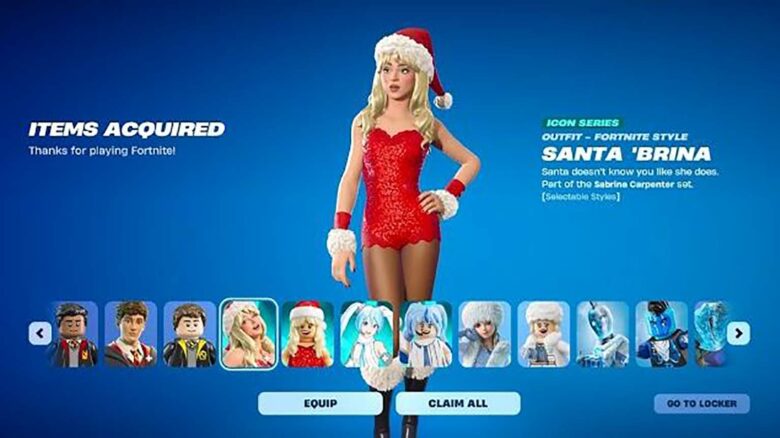
One item stands out during this celebration: the Santa Sabrina skin. You need to know when it appears and how to secure it before it leaves the Item Shop.
Getting the Santa Sabrina Outfit in Fortnite
You can only unlock the Santa Sabrina outfit through the Fortnite Item Shop. The skin does not appear as a free Winterfest reward, so you need enough V-Bucks before it rotates in.
Open the Item Shop from the main menu and check the Featured area. Navigate to the Icon Series tab, where Epic groups celebrity collaborations and related cosmetics.
You have two purchase options, depending on what you want to collect:
| Purchase Option | What You Get | Cost |
|---|---|---|
| Santa Sabrina Bundle | Skin, Winterfest Sack Back Bling, Manchild Jam Track, Manchild Emote | 2,400 V-Bucks |
| Santa Sabrina Skin Only | Outfit only | 1,500 V-Bucks |
Buying the bundle saves V-Bucks if you want the full cosmetic set. If you only care about the outfit, the standalone option keeps the cost lower.
Once you confirm the purchase, the items unlock immediately and stay in your locker. You can equip the outfit from the Locker tab and use it in any supported game mode.
Expected Item Shop Release Timing
Epic schedules the Santa Sabrina outfit to arrive on December 22, aligning with the Winterfest event. Item Shop rotations usually refresh daily, so availability depends on that schedule.
Icon Series cosmetics sometimes appear earlier than expected. You should check the Item Shop regularly around the release window to avoid missing it.
The outfit features a holiday-themed red design with Sabrina’s recognizable blonde hair and a festive Santa hat. The look replaces her earlier gold-style appearance with a seasonal version designed for Winterfest celebrations.